PingKit for Developers
Not every check needs a laptop open. Confirm a deploy is live, a webhook endpoint is listening, or a DNS record propagated, straight from your phone, between meetings or away from your desk.
The Tools You'll Reach For
| Situation | PingKit tool |
|---|---|
| Checking an API's response headers and status code | HTTP Analyzer |
| Confirming a webhook port is open and listening | Port Scanner |
| Checking DNS records or propagation for a domain | DNS Lookup |
| Latency to a service or region from where you are | Ping Test, MTR |
| Waking a build server or NAS remotely | Wake on LAN |
| Watching a self-hosted service for downtime | Uptime Watch (Guardian) |
Checking a Deploy Without Opening a Terminal
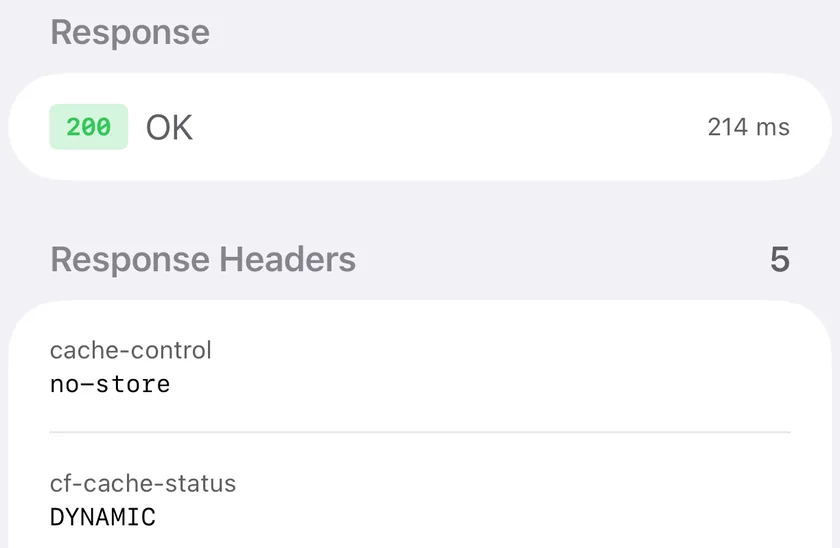
HTTP Analyzer makes a real request to any URL and shows the status code, response headers, and timing - enough to confirm a deploy actually went live, a redirect is pointing where it should, or a CDN is serving cached vs. fresh content, without SSHing in or opening a laptop. It's not a curl replacement for scripting, but for the "did that actually work" check between meetings, it's faster than finding a terminal.
Is Anything Even Listening?
Before debugging why a webhook isn't firing or an API call is timing out, the first question is simpler: is anything listening on that port at all. Port Scanner answers that directly - point it at a host and port and see if it's open, closed, or filtered, which narrows a "webhook not working" ticket down fast before you go digging through application logs for a problem that's actually just a closed port or a firewall rule.
DNS Without dig
DNS Lookup queries A, AAAA, MX, TXT, NS, and CNAME records for any domain and shows the raw response - useful for confirming a domain-verification TXT record is live, an MX change propagated, or a new A record is resolving correctly from wherever you're standing, which sometimes differs from what your office network sees.
Working with a team? PingKit is intentionally a single-user tool - there's no shared team dashboard or multi-seat account. For a service that genuinely needs 24/7 monitored uptime with team visibility, pair PingKit's on-the-go checks with a dedicated uptime service; PingKit is better suited to the manual "let me just check" moment than as your team's monitoring system of record.
Frequently Asked Questions
Can PingKit replace curl for checking an API?
Not for scripting - it's a manual tool. HTTP Analyzer is good for a fast one-off check of headers, status, and timing without a terminal.
Can I test if my webhook endpoint is reachable?
Port Scanner confirms the port is open, and HTTP Analyzer confirms the endpoint responds as expected. It won't send a signed test payload.
Does PingKit help debug DNS issues?
Yes - DNS Lookup queries any record type for any domain and shows the raw response, similar to dig or nslookup but from your phone.
Related Use Cases
Debug From Anywhere
19 free network tools, no ads, no account. Uptime Watch unlocks with Guardian at $2.99/mo.
Download PingKit Free