Inspect any website's SSL/TLS certificate, check expiration dates, view subject alternative names, and verify the complete certificate chain. All from your iPhone.
SSL Inspector and all 19 tools are free. No ads, no account required.
What PingKit's SSL Inspector Does
PingKit connects to any server over TLS and retrieves the full certificate details. You see the issuer, subject, validity period, serial number, signature algorithm, and subject alternative names. The complete certificate chain is displayed so you can verify that intermediate certificates are correctly configured.
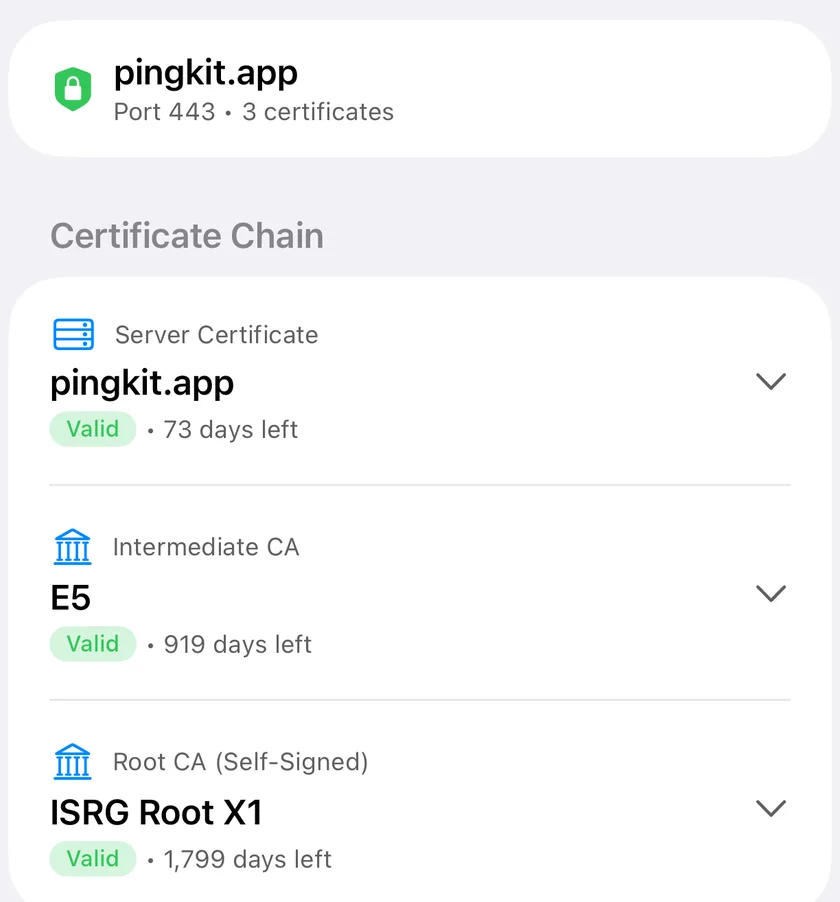
The whole chain, leaf to root, with the days left on each. A leaf that is valid above an intermediate that is not is a site that breaks anyway.
Certificate Details
View the full X.509 certificate including issuer, subject, SANs, serial number, signature algorithm, and key size. Everything you'd see in a browser's certificate viewer, but faster to access.
Expiry Monitoring
See the exact expiration date and days remaining for any certificate. Catch expiring certificates before they cause downtime and browser security warnings for your users.
Self-Signed & CA Detection
PingKit flags whether a certificate is self-signed or CA-issued, and whether it's itself a certificate authority (CA) certificate. Misconfigured or unexpected certificates stand out immediately.
Chain Verification
Inspect the certificate chain the server presents, the leaf and intermediate certificates. A missing intermediate is one of the most common SSL configuration errors, and PingKit makes it immediately visible.
Who Needs SSL Inspection
Website Administration
Managing websites means managing certificates. Whether you use Let's Encrypt with 90-day certificates, a commercial CA with annual renewals, or a CDN that handles certificates automatically, you need to verify that the right certificate is being served. PingKit lets you check any domain instantly without opening a browser, navigating to the site, and clicking through the certificate viewer.
Security Auditing
Weak certificate configurations are a common security finding. PingKit shows you the signature algorithm and public key size for every certificate, so you can identify certificates still signed with deprecated algorithms like SHA-1, or self-signed certificates presented where a CA-signed one is expected. This makes quick security spot-checks possible from anywhere.
Troubleshooting HTTPS
When users report certificate errors, you need to see exactly what the server is presenting. Is it serving the wrong certificate? Is an intermediate missing? Has the certificate expired? Is the subject alternative name list correct? PingKit answers all of these questions without needing access to the server itself. Connect from your phone and inspect what the server sends.
Verifying Certificate Renewal
After renewing a certificate, you need to confirm the new one is actually being served. Check the serial number and expiry date to verify the renewal was deployed correctly. This is especially important with auto-renewal systems like Let's Encrypt or ACME, where deployment can silently fail while the renewal itself succeeds.
Complete Security Toolkit
SSL Inspector is part of PingKit's broader security and infrastructure toolkit. Pair it with Port Scanner to check which services are exposed on a server, DNS Lookup to verify domain configuration, and WHOIS to check domain registration details. Together, these tools give you a complete picture of any domain's configuration and security posture, all from your iPhone with no command line required.
Most people only think about certificates when something breaks. But a quick certificate check is one of the fastest ways to answer a surprising number of everyday networking and security questions. Here are the situations where we reach for PingKit's SSL Inspector most often.
Check a site's certificate before trusting it
Before you enter a password, payment details, or anything sensitive, it's worth confirming who actually holds the certificate for that domain. The Inspector shows you the issuer and the exact subject the certificate covers, so you can verify the site is presenting a legitimate, current certificate from a recognized authority rather than something expired, mismatched, or self-signed. Pair this with a quick WHOIS lookup to see who registered the domain and when, and you have a solid first-pass trust check in under a minute.
Find the exact expiry date
Certificates expire, and an expired certificate takes a site down hard: every visitor sees a full-page browser warning. The Inspector shows the precise expiration timestamp and the number of days remaining, so you can tell at a glance whether a renewal is overdue or coming up. This is especially handy for Let's Encrypt certificates, which last only 90 days and rely on automation that occasionally fails silently.
Debug "your connection is not private" errors
When a browser throws a privacy or certificate error, it rarely tells you why in plain terms. Inspecting the certificate directly shows you the actual cause: an expired date, a hostname that isn't in the certificate, an untrusted issuer, or a broken chain. Instead of guessing, you see exactly what the server is presenting and can fix the right thing the first time.
Verify your own site's certificate chain
After deploying or renewing a certificate, you need to confirm the server is sending the complete chain, not just the leaf certificate. A missing intermediate is the single most common HTTPS misconfiguration we see. The Inspector walks the full chain from your server's certificate up to the trusted root, so you can confirm every intermediate is in place before users hit a problem. If you're also debugging response headers or redirects, our HTTP analyzer pairs neatly with this check.
Check a certificate's signature algorithm strength
Security audits and compliance checklists often flag certificates still signed with deprecated algorithms like SHA-1. The Inspector reports the exact signature algorithm and public key size for any certificate, so you can spot one that needs reissuing with a stronger algorithm. It's a fast way to confirm a server meets a baseline without firing up a laptop.
What's in a certificate
An SSL/TLS certificate is a small, signed file built on the X.509 standard. It does two jobs: it carries the public key used to encrypt your connection, and it makes a verifiable claim about who controls the server. Here's what each field means, in plain English.
Issuer (the CA)
The issuer is the certificate authority (CA) that signed the certificate, such as Let's Encrypt, DigiCert, or Sectigo. Clients trust a small set of root CAs that ship with the operating system. If the issuer chains back to one of those roots, the certificate is trusted automatically.
Subject
The subject identifies who the certificate is for. For a public website this is the domain name. Historically the Common Name field held the hostname, but modern clients ignore it for hostname matching.
Validity dates
Every certificate has a "not before" and "not after" date. The connection is only trusted while the current time falls inside that window. Outside it, clients reject the certificate even if everything else is perfect.
Subject Alternative Names (SAN)
The SAN field lists every hostname the certificate is valid for, including wildcards like *.example.com. This is the field clients actually check when matching the hostname you typed against the certificate. A certificate can cover many names at once, which is why the SAN list matters more than the subject for diagnosing mismatches.
Chain of trust
Servers rarely present a certificate signed directly by a root CA. Instead, a root signs an intermediate, and the intermediate signs your certificate. That sequence is the chain of trust. A client follows the chain upward until it reaches a root it already trusts. Break any link and trust collapses, which is why the Inspector shows the whole chain rather than just the leaf.
Self-signed vs CA-signed
A CA-signed certificate is vouched for by a trusted authority. A self-signed certificate is signed by its own key, so nothing external vouches for it. Self-signed certificates still encrypt traffic, but clients can't verify identity, so they're suited to internal tools and development rather than public sites.
Have the Certificate Explained to You
The vocabulary above is the part that puts people off: issuer, chain, SAN list, validity window, signature algorithm. If you would rather not learn it, PingKit can read the result back in plain language. Run a check in SSL Inspector and tap Explain This Result under the output. You get a short explanation of the certificate in front of you: who issued it, how the chain is assembled, which hostnames the SAN list covers, how long is left before it expires, and what the signature algorithm means in practice.
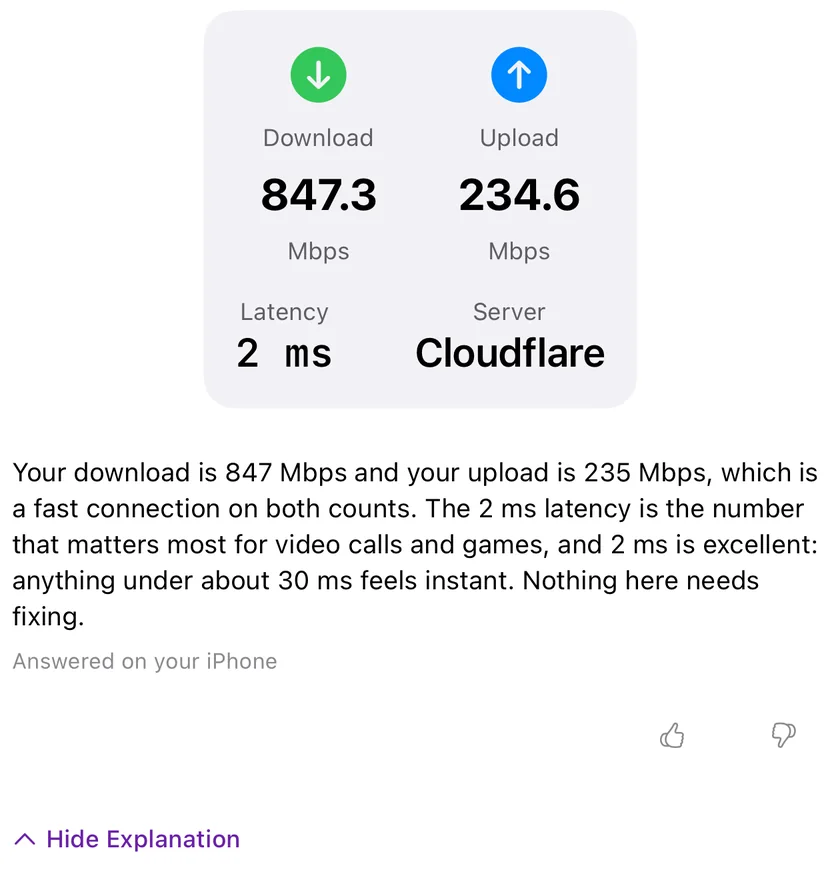
The same control under a speed test. Answered on your iPhone, which is the caption every answer carries, naming the rung that wrote it.
It never fires on its own. It is a tap, every time, on all 18 tools that carry it. What travels with the request is the text the Inspector already put on screen: the host and port you typed, how many certificates are in the chain, and the leaf certificate's subject, issuer, signature algorithm, key size, days until expiry and the names it covers. Nothing else about your network goes with it: no device names, no MAC addresses, and nothing about the other devices on it.
The explanation is free. PingKit tries your device's own model first, then Apple's Private Cloud Compute for Guardian subscribers, then its own service last, and every answer is labeled with which of the three wrote it. An answer your iPhone writes by itself spends nothing. Without a subscription you get 15 AI interactions a week, shared across every AI feature in PingKit and capped at 5 in a day.
iPhone and iPad only. Explain This Result is not in the Mac Agent.
PingKit vs other SSL checker apps
There are a handful of SSL checker apps and web tools out there. Here's an honest look at where PingKit fits, so you can decide whether it's the right tool for what you need.
PingKit
Typical free SSL apps
Web-based checkers
Cost & ads
Free, no ads, no account
Often ad-supported or paywalled
Free but ad-heavy
Full chain & SAN view
Yes, leaf to root
Usually leaf only
Yes, but desktop-oriented
Part of a wider toolkit
19 tools (DNS, WHOIS, ports, HTTP)
SSL only
Single-purpose page
Automated expiry monitoring
Yes, with Guardian Plus
Rare
Sometimes, with paid signup
We'll be straight about the trade-offs. A dedicated desktop tool or a service like SSL Labs goes deeper on grading and edge-case protocol testing than a phone app needs to. PingKit's goal is different: fast, ad-free, on-demand certificate checks from the device that's already in your pocket, sitting alongside the other 19 tools you reach for when something on the network looks wrong. For most "is this certificate okay right now?" questions, that's exactly the right shape.
Troubleshooting common certificate errors
When HTTPS breaks, the error message is usually vague. Here's how to read the most common failures and what each one points to. In nearly every case, inspecting the certificate directly turns a guessing game into a clear fix.
Certificate expired
The most common and most preventable failure. The Inspector shows the "not after" date and days remaining; if that number is negative, the certificate has lapsed and every client is rejecting it. Renew and redeploy, then re-check the serial number to confirm the new certificate is actually live. To stop this happening again, set up monitoring so you're warned weeks ahead rather than the moment it breaks.
Name mismatch
This means the hostname you connected to isn't in the certificate's SAN list. Check the SAN entries the Inspector displays. Often the fix is as simple as the certificate covering example.com but not www.example.com, or a wildcard not reaching the subdomain depth you need. Reissue the certificate with the correct names and the mismatch clears.
Untrusted or incomplete chain
If the Inspector shows the chain stopping before it reaches a trusted root, an intermediate certificate is missing or the issuer isn't trusted. Reinstall the full chain (your certificate plus every intermediate, in order) on the server. This is the fix for the classic "works in one place, fails in another" certificate problem.
Works in browser but the app says invalid
Browsers are forgiving: they cache intermediates and sometimes fetch missing ones automatically, which masks a server that isn't sending its full chain. Apps and command-line clients usually don't. So a site can look fine in Safari yet fail in your app. The Inspector shows the exact chain the server sends, with no browser magic, so the missing intermediate becomes obvious. Fix the server's chain and both will work.
Self-signed certificates
Self-signed certificates trigger warnings on public sites because no authority vouches for them. The Inspector flags self-signed certificates clearly. If you intended it to be self-signed (internal tooling, a lab device), the warning is expected. If you didn't, the server is presenting the wrong certificate and you should deploy a CA-signed one. If you're chasing down the right host for a domain in the first place, a DNS lookup confirms which server is actually answering for that name.
Frequently asked questions
How do I check an SSL certificate on iPhone?
Open PingKit, go to SSL Inspector, and enter any domain name. PingKit connects to the server, retrieves the full certificate, and shows the issuer, subject, validity dates, serial number, signature algorithm, subject alternative names, and the complete chain.
How do I check when an SSL certificate expires?
The Inspector shows the exact expiration date and time for any certificate, plus how many days remain. That makes it easy to catch certificates that need renewal soon, including short-lived Let's Encrypt certificates on their 90-day cycle.
What is a certificate chain and why does it matter?
A chain links your server's certificate to a trusted root CA through one or more intermediates. If any link is missing, clients show security warnings even when the server certificate itself is valid. PingKit displays the entire chain so you can verify intermediates are configured correctly.
Does PingKit show a certificate's signature algorithm?
Yes. The Inspector displays the exact signature algorithm and public key algorithm and size for any certificate, so you can spot one still signed with a deprecated algorithm like SHA-1.
Why does my certificate work in the browser but my app says it's invalid?
Almost always a missing intermediate. Browsers cache and sometimes fetch intermediates automatically, hiding an incomplete chain that apps and CLI tools reject. The Inspector shows the exact chain the server sends, so reinstalling the full chain fixes both.
What does a name mismatch error mean?
The hostname you connected to isn't listed in the certificate's SAN field. Modern clients check SANs only, not the legacy Common Name. The Inspector lists every SAN so you can see exactly which names the certificate covers.
Is it safe to use a self-signed certificate?
It encrypts traffic fine, but no authority vouches for it, so clients can't verify the server's identity. That's acceptable for internal tools and development, but not for public websites, where browsers show a security warning. PingKit clearly flags self-signed certificates.
Can I check certificates on non-standard ports?
Yes. The Inspector connects to any hostname and port, so you can check mail servers (465, 993), APIs on custom ports, or internal services. Just specify the port alongside the hostname.
Does PingKit charge for SSL checks?
No. The SSL Inspector and all 19 tools are free, with no ads and no account. Guardian Plus ($9.99/mo or $79.99/yr on iPhone and iPad, $4.99/mo on Mac) adds automated certificate expiry monitoring, 30-day history, and compliance export on top, but every on-demand check is free. You can read more in our guide on how to monitor SSL certificate expiration.
Need continuous monitoring?
SSL Inspector checks certificates on demand. Cert Monitor watches your domains and pushes a notification 30, 14, 7 and 1 days before a certificate expires, and immediately if the chain fails. One domain is free, Guardian watches 5 and Guardian Plus watches 50.
Noxen - our sister Mac app - checks TLS, security headers, and CVE exposure across your full Linux/VPS fleet on a nightly schedule. PingKit handles ad-hoc cert checks; Noxen handles the ongoing fleet.