PingKit vs PingPlotter
Same underlying technique, different job. PingPlotter is desktop software that traces a route continuously for hours or days to build evidence. PingKit's MTR is a free mobile trace you run right now, in the moment. Here's the honest breakdown.
PingPlotter is Windows/Mac desktop software built around long-running traceroute monitoring - it pings every hop to a destination repeatedly over time and charts latency, jitter, and packet loss per hop, historically. That history is exactly what makes it useful for documenting an intermittent ISP problem across a support call. PingKit's MTR tool traces every hop the same way, but as a free, on-demand mobile check - open the app, run it, see per-hop results immediately. We make PingKit, so weigh that, but PingPlotter's pricing and tiers below are checked against its own current published plans.
What Each One Actually Is
| Capability | PingKit (MTR) | PingPlotter |
|---|---|---|
| Platform | iPhone/iPad app | Windows/Mac desktop software |
| Per-hop latency & loss trace | Yes | Yes |
| Continuous 24/7 background monitoring | Not offered on iOS | Yes, Standard tier and up |
| Historical charts over hours/days | Not offered | Yes |
| Jitter & MOS scoring | Not offered | Professional tier, $29/mo |
| Multi-target simultaneous monitoring | One trace at a time | Yes |
| Cost | Free | Free tier limited; $6.99-$90/mo for full features |
| Other network tools bundled | 18 more - speed test, DNS, WiFi analyzer, and more | Not offered - trace/monitoring focus |
Where PingPlotter Wins
If you need to prove an intermittent problem exists - the kind an ISP support rep dismisses because it isn't happening during the call - PingPlotter's ability to run unattended for days and produce a timestamped historical chart is genuinely the right tool. PingKit's MTR can't do that; iOS's background execution limits mean nothing on iPhone can run a continuous trace the way desktop software can. If ongoing per-hop evidence gathering is the job, PingPlotter is built for it and PingKit isn't trying to compete there.
Where PingKit Wins
Most people don't need days of historical charting - they need to know right now, mid-problem, which hop is dropping packets, without installing software on a computer. MTR does that free, from the phone already in your hand, paired with Ping Test and Speed Test for the rest of the picture. For lighter ongoing visibility without full historical trace charts, Guardian's Uptime Watch, and the Scheduled Speed Tests the free Mac Agent runs, give periodic checks - not PingPlotter's continuous granularity, but enough to catch that something's wrong.
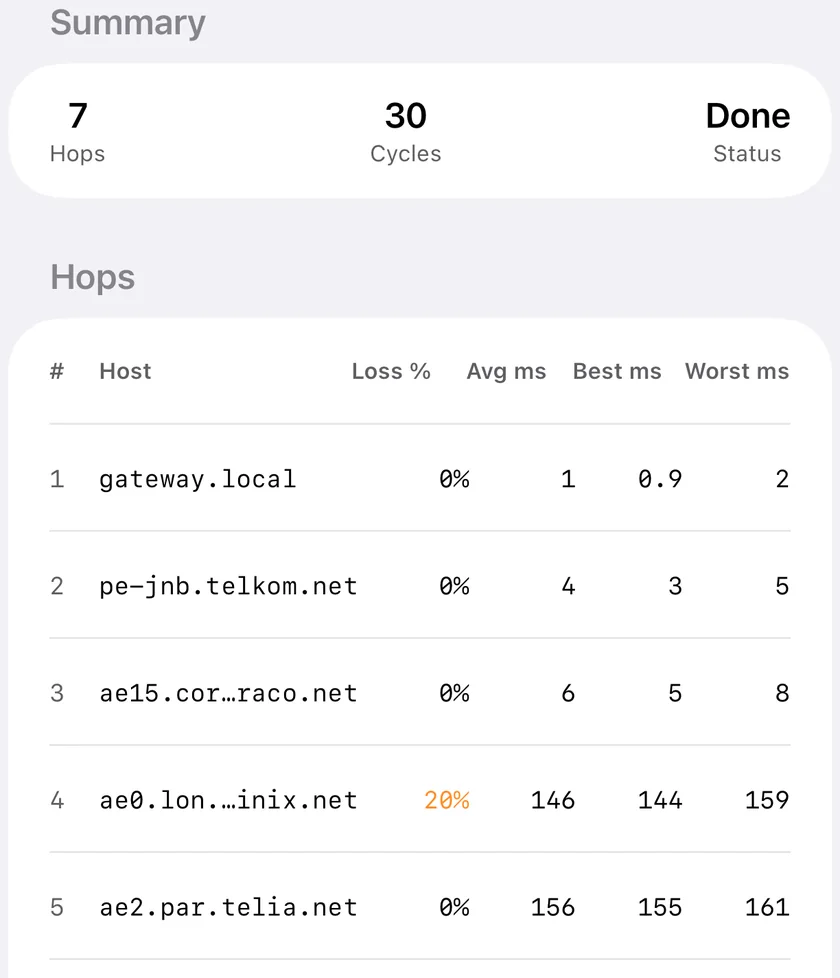
The honest recommendation: building a documented case for an ISP support escalation, especially something intermittent? PingPlotter's continuous desktop monitoring is the stronger tool. Need to check what's happening on your route right now, from your phone, for free? That's exactly what MTR is for. See our guide to proving your internet keeps dropping for using either approach as evidence.
Which Should You Choose?
- Need days of unattended historical trace data: PingPlotter. PingKit can't run continuously on iOS.
- Need a quick per-hop check right now, from your phone: PingKit's MTR, free.
- Building an ISP support case over time: PingPlotter's charts are stronger evidence.
- Want the rest of a network toolkit regardless: Download PingKit free - 19 tools, MTR is one of them.