PingKit vs Pingdom
Different weight class, worth saying upfront: Pingdom (by SolarWinds) is enterprise-grade synthetic monitoring, priced per plan through its own configurator rather than from a published entry price. PingKit's Uptime Watch is a $2.99/month feature bundled inside a free network toolkit. If uptime monitoring is your whole job, this isn't a fair fight - Pingdom wins it.
Pingdom is a dedicated monitoring platform: uptime checks, page speed monitoring, real user monitoring (RUM), transaction monitoring, and public status pages, managed from a web dashboard with a companion mobile app for alerts. PingKit is a free iPhone/Mac network toolkit where Uptime Watch is one Guardian feature among several, not the product. We make PingKit, so weigh that accordingly - every number below is checked against Pingdom's current published pricing and PingKit's actual shipped feature set.
Feature-by-Feature
| Capability | PingKit (Guardian) | Pingdom (Starter) |
|---|---|---|
| Check interval | Every 5 minutes (hourly on the free tier) | As often as 1 minute |
| Starting price | $2.99/mo | Quoted per plan |
| Free tier | Uptime Watch free for 1 URL checked hourly, plus 19 tools, all permanently | No permanent free plan, trial only |
| Page speed monitoring | Not offered | Yes |
| Real user monitoring (RUM) | Not offered | Yes, separate add-on plan |
| Transaction / multi-step monitoring | Not offered | Yes |
| Public status page | Not offered | Yes |
| Setup and viewing entirely in a mobile app | Yes | Alerts only - setup lives on the web dashboard |
| Device discovery, port scan, DNS, security scan, 15 more tools | Yes, free | Not offered |
Where Pingdom Wins
If uptime monitoring is a business function - a client's production site, an e-commerce checkout flow, anything where minutes of downtime cost real money - Pingdom is built for that job and PingKit isn't trying to compete with it. Sub-minute checks, page speed and transaction monitoring, RUM, and public status pages are genuine enterprise features PingKit doesn't have. If you need those, Pingdom is the right spend.
Where PingKit Wins
If what you're watching is personal - a home server, a self-hosted app, a side project, a NAS's remote-access page - Pingdom's enterprise feature set and pricing are more than the job calls for. Guardian's Uptime Watch costs $2.99/month total, and that same subscription also puts the free Mac Agent's home-network monitoring, and the scheduled speed tests it runs, on your iPhone, not just one URL. It sits alongside Security Scan, SSL Inspector, and 16 more free tools in the same app - a bundle, not a specialist platform.
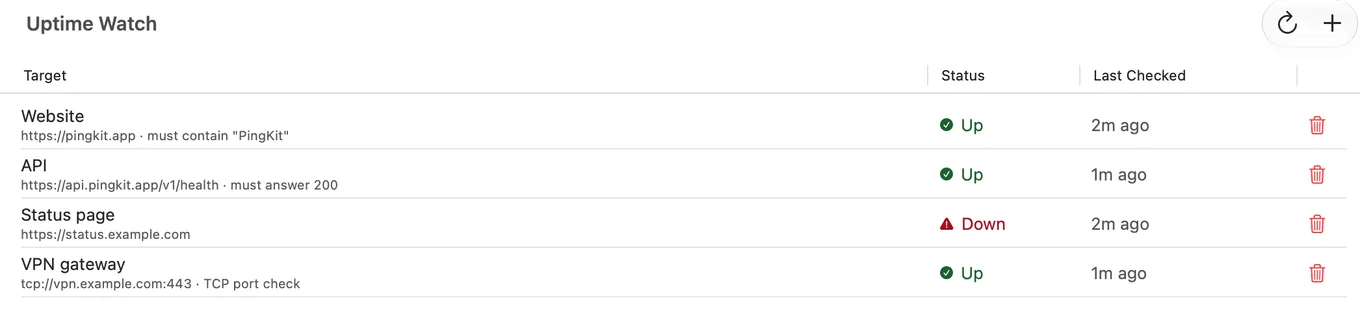
The honest trade-off: on Guardian an outage could run up to five minutes before Uptime Watch notices, and up to an hour on the free tier, against Pingdom's one-minute checks - not acceptable for anything business-critical, genuinely fine for "is my home server still up." Match the tool to what's actually at stake, and to what you're willing to pay per month for the difference.
Which Should You Choose?
- Monitoring something business-critical, need sub-minute detection or RUM/transaction monitoring: Pingdom.
- Watching a personal server/NAS/side project and want it bundled with a network toolkit: PingKit's Uptime Watch.
- Want the rest of PingKit's toolkit regardless: Download PingKit free - Uptime Watch is optional, the other 18 tools aren't gated.
More Comparisons
- PingKit vs UptimeRobot
- PingKit vs Uptime Kuma
- PingKit vs PingPlotter
- PingKit vs Wireshark
- How to Monitor Website Uptime from Your iPhone
- Best Website Uptime Monitoring Apps for iPhone (2026)
- Every PingKit comparison
Try PingKit Free
19 network tools, no ads, no account. One Uptime Watch URL is free permanently; Guardian at $2.99/mo unlocks 10 URLs and 2 more features.
Download PingKit Free